
To estimate how many boxes fit on a pallet, first count the boxes in one layer. Then check how many complete layers fit below the overall height limit and within the gross-weight limit. The smaller layer count controls the result.
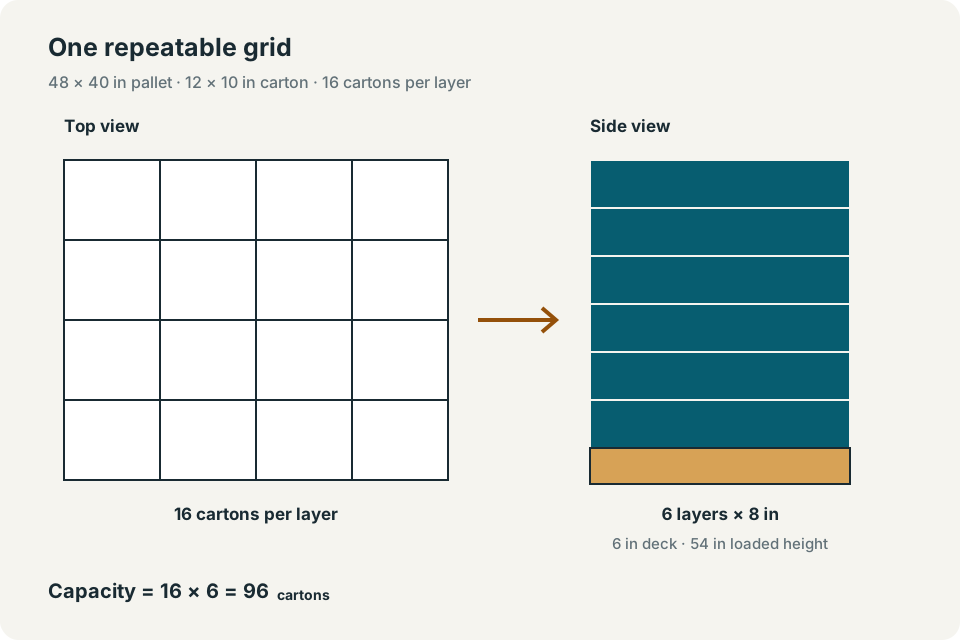
For the example used here, a 48 × 40 in pallet holds 16 cartons per layer and 6 complete layers, or 96 cartons per full pallet. An order of 250 cartons requires 3 pallets: 2 full pallets and a final pallet with 58 cartons.
The pallet calculator compares two uniform rectangular grids. It does not arrange different carton orientations within the same layer. Treat its result as a capacity estimate to review against the actual packaging and handling requirements.
Measure the pallet and carton
Use the usable pallet footprint and the outside dimensions of a packed carton. Inside carton dimensions describe product clearance; they do not describe the space the closed carton occupies on the pallet.
- Enter pallet length and width.The example uses 48 × 40 in. Use the footprint available for this load after any required edge clearance. The form has no overhang allowance.
- Enter deck height and empty pallet weight.These are included in loaded height and gross weight. The example uses a 6 in deck and 50 lb of pallet tare.
- Enter maximum total height and maximum gross weight.The example limits are 60 in from the floor and 2,000 lb including the pallet. These are entered planning limits, not ratings established by the calculator.
- Enter carton dimensions and gross carton weight.The example carton is 12 × 10 × 8 in and weighs 12 lb including its contents and packaging.
- Set rotation and order quantity.Allowing rotation compares the two footprint orientations while keeping the 8 in side vertical. Enter 250 cartons to calculate the order's pallet count.
Dimensions and carton weight must be positive. Deck height and pallet tare may be zero. The height limit must exceed the deck height, and the gross limit must exceed pallet tare. An optional order quantity must be a nonnegative whole number. If no complete layer fits, the form reports an error rather than a usable capacity.
Calculate boxes per layer
Divide each pallet side by the corresponding carton side and round each quotient down. The floor symbol, ⌊ ⌋, means to keep only the whole number. A fraction of a carton cannot occupy the remaining strip.
Original grid = ⌊pallet length ÷ carton length⌋ × ⌊pallet width ÷ carton width⌋Rotated grid = ⌊pallet length ÷ carton width⌋ × ⌊pallet width ÷ carton length⌋The original grid gives ⌊48 ÷ 12⌋ × ⌊40 ÷ 10⌋ = 4 × 4 = 16 cartons. The rotated grid gives ⌊48 ÷ 10⌋ × ⌊40 ÷ 12⌋ = 4 × 3 = 12. With rotation enabled, the calculator keeps 16. With rotation disabled, it uses the original grid even if the other orientation would fit more cartons.
Check height and gross weight
Subtract pallet deck height before counting carton layers. Separately, subtract pallet tare from the gross-weight limit before calculating how many complete layers the remaining weight allowance supports.
Height-limited layers = ⌊(maximum total height − deck height) ÷ carton height⌋Weight-limited layers = ⌊(maximum gross weight − pallet tare) ÷ (cartons per layer × gross carton weight)⌋Full-pallet capacity = cartons per layer × min(height-limited layers, weight-limited layers)The model retains complete layers. It does not use a partially filled top layer to consume the last part of a weight allowance. For example, increasing carton weight to 40 lb while keeping the other inputs unchanged gives ⌊1,950 ÷ 640⌋ = 3 weight-limited layers. Capacity falls to 48 cartons, even though height alone would allow 6 layers.
Worked example: 96 cartons per full pallet
Enter the example inputs
| Input | Value |
|---|---|
| Pallet length × width; deck height | 48 × 40 in; 6 in |
| Empty pallet weight | 50 lb |
| Maximum overall height; maximum gross weight | 60 in; 2,000 lb |
| Carton length × width × height | 12 × 10 × 8 in |
| Gross weight per carton; order quantity | 12 lb; 250 cartons |
Check the capacity and reported load
Compare the two layer limits
Height permits ⌊(60 − 6) ÷ 8⌋ = 6 layers. Weight permits ⌊(2,000 − 50) ÷ (16 × 12)⌋ = ⌊10.15625⌋ = 10 layers. The smaller result is 6, so capacity is 16 × 6 = 96 cartons.
Check height, gross weight and the order remainder
The full pallet is 6 + 6 × 8 = 54 in high and weighs 50 + 96 × 12 = 1,202 lb gross. For the order, ⌊250 ÷ 96⌋ = 2 full pallets; 250 − 2 × 96 = 58 cartons remain. Rounding 250 ÷ 96 upward gives 3 pallets total.
The displayed loaded height and gross weight describe a full-capacity pallet. They are not recalculated for the 58-carton remainder. A zero remainder means there is no partial pallet; it does not mean the final full pallet is empty.
Compare common carton and pallet cases
| Pallet footprint | Carton dimensions | Cartons per layer | Allowed layers | Capacity |
|---|---|---|---|---|
| 48 × 40 in | 12 × 10 × 8 in | 16 | 6 | 96 cartons |
| 48 × 40 in | 15 × 12 × 8 in | 9 | 6 | 54 cartons |
| 48 × 48 in | 12 × 10 × 8 in | 16 | 6 | 96 cartons |
| 48 × 40 in | 10 × 10 × 10 in | 16 | 5 | 80 cartons |
A larger footprint does not necessarily increase the result because the grid uses whole cartons. These alternatives also say nothing about pallet purchase cost, carton strength or load stability.
Review the physical load before shipping
A geometric fit does not establish pallet structural capacity, carton compression strength or transport stability. Review the actual stack pattern, pallet support, center of gravity, wrap or strap system, and handling method with the people responsible for the load.
For mixed carton sizes or different orientations within a load, the mixed-product pallet planner provides a separate, bounded placement heuristic. Its geometry checks still do not certify a shipping load.
Use the capacity as a planning input
Enter measured values in the pallet calculator, check the controlling layer limit, and compare the reported full-pallet height and gross weight with your limits. Use the order remainder to plan the final pallet separately. Confirm the packaging and handling arrangement before turning that estimate into a shipping plan.
FAQs
Does the 96-carton result prove the pallet is safe to ship?
No. It is a uniform-grid estimate under the entered height and weight limits. It does not test carton compression, pallet strength, load stability or transport securement.
Can the calculator use an incomplete top layer?
No. Its capacity uses the greatest number of complete layers allowed by height and gross weight.
Sources
These references support the methods or rules used on this page. Check the version effective for your shipment date and any applicable carrier terms or item-specific provisions.