
To count identical rectangular products in a carton, compare the product dimensions with the usable carton dimensions on all three axes. A uniform grid can use the product upright, or it can compare additional orientations when side laying is allowed.
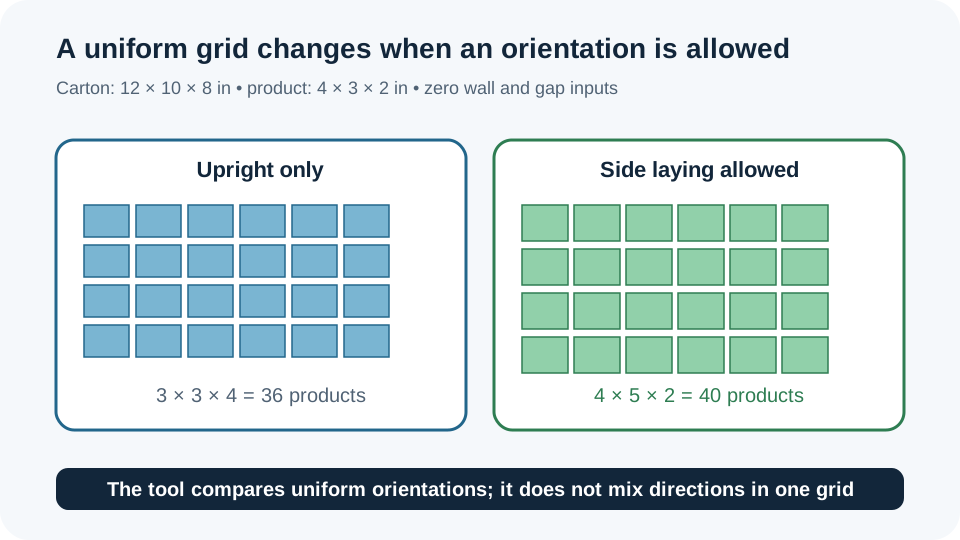
For a 12 × 10 × 8 inch carton and a 4 × 3 × 2 inch product, upright-only placement gives 36 products. Allowing the product to lie on its side lets the best uniform grid become 4 × 5 × 2, or 40 products.
The products-per-carton calculator counts geometric fit. It does not mix orientations, assess cushioning, test carton strength or select a supplier's manufacturing size.
Measure the carton and product
Use internal carton dimensions and the product dimensions that must fit inside. Enter wall clearance and gaps when the packaging plan requires them; the example uses zero for both so the orientation arithmetic is easy to see.
- Enter the carton inside length, width and height.The example is 12 × 10 × 8 in.
- Enter product length, width and height.The example is 4 × 3 × 2 in.
- Enter wall clearance and inter-product gap.Each carton axis reserves clearance at both walls; gaps apply between neighboring products.
- Choose the permitted orientation rule.Upright-only compares two footprint directions. Allowing side laying compares all six axis orientations and still chooses one uniform grid.
Compare permitted orientations
Usable carton side = max(0, internal side − 2 × wall clearance)Count on an axis = floor((usable side + gap) ÷ (product side + gap))Uniform-grid capacity = count on axis 1 × count on axis 2 × count on axis 3Worked example: 36 upright products versus 40 with side laying
| Rule | Best orientation | Grid arithmetic | Result |
|---|---|---|---|
| Upright-only | 4 × 3 × 2 | floor(12 ÷ 4) × floor(10 ÷ 3) × floor(8 ÷ 2) | 3 × 3 × 4 = 36 products |
| Side laying allowed | 3 × 2 × 4 | floor(12 ÷ 3) × floor(10 ÷ 2) × floor(8 ÷ 4) | 4 × 5 × 2 = 40 products |
The calculator keeps the unrounded quotients until each axis is floored. A fraction of a product cannot occupy the leftover strip, so each axis count is a whole number.
Read the grid limit
| Input | Effect on the count |
|---|---|
| Carton inside dimensions | Set the outer space available to the grid. |
| Product dimensions | Set the occupied length on each chosen axis. |
| Wall clearance | Reduces each usable carton side twice, once at each wall. |
| Inter-product gap | Reduces the number of neighboring products that can fit. |
| Allowed orientation | Controls whether the tool compares two or six uniform rotations. |
For the example, the upright-only 36-product result uses a 90% product-cube utilization, while the side-laying 40-product grid fills the entered cube mathematically. A geometric result still does not prove that the products can be protected or that the carton is strong enough.
Compare carton grid cases
| Wall | Gap | Orientation rule | Best uniform result |
|---|---|---|---|
| 0 in | 0 in | Upright only | 36 products |
| 0 in | 0 in | Side laying allowed | 40 products |
| 0.25 in | 0 in | Upright only | 18 products |
| 0 in | 0.25 in | Upright only | 18 products |
Clearance and gaps are inputs, not hidden allowances. Enter the values required by the actual pack arrangement before treating a count as usable.
Use the products-per-carton calculator
Measure the carton cavity and product, enter the clearances and choose whether side laying is permitted. Read the selected orientation, axis counts and volume utilization together; the largest count is still a uniform-grid estimate.
If you need to turn a chosen product grid into nominal carton dimensions, use the carton size calculator as a separate sizing step.
FAQs
Can the tool mix upright and side-laying products?
No. It compares permitted uniform orientations and selects the best one. Mixed-orientation packing is outside this result.
Does 40 products mean the carton is ready for production?
No. The count is geometric. Confirm cushioning, product condition, carton strength, closure space and supplier manufacturing allowances separately.