
Prepare shipment details for the carrier's bill of lading
A bill of lading records shipment and transportation details. This page provides a generic preparation worksheet to organize those details before you complete the document required by your carrier. It does not issue a carrier document or tracking number, book transportation or record carrier acceptance.
Choose the bill of lading worksheet for the full form. Choose the shipment summary when collecting the same information for a quote. The summary omits the optional freight-class column and does not calculate a rate.
Fill the worksheet in the order the freight is prepared
- Select the document format, then enter your shipment reference and planned shipping date. The reference is yours; the tool and carrier do not issue it.
- Enter the shipper and consignee names and addresses. The consignee is the recipient named for delivery.
- Record the intended carrier and purchase order or other order reference, if known.
- In “Handling units and packaging,” distinguish pallets from the cartons or other packages they contain.
- Add an item row for each goods description. Enter its package count and, if known, gross weight and unit.
- Enter a freight class or National Motor Freight Classification (NMFC) item only when independently confirmed. Add service requests and instructions, then compare the preview with the shipment.
| Field | What to record | What to avoid |
|---|---|---|
| Goods description | Specific goods and their packaging, with enough detail to recognize the line | Using a density estimate as a substitute for a commodity description |
| Package count | A positive whole count on the stated line basis | Counting 2 pallets and their 24 cartons as 26 equivalent handling units |
| Gross weight and unit | Weight corresponding to that line, including applicable packaging and pallet tare | Mixing a per-carton weight with a pallet count without explaining the basis |
| Verified class or NMFC item | Confirmed information for the actual freight, if available | Treating the worksheet as a classification lookup |
Shipper and consignee names and addresses are required for filled printing, along with a description and positive whole package count in each item row. Gross weight is optional, but must be positive when entered. Up to 30 rows are supported. The worksheet preserves entries; it does not add line weights, convert units or calculate density.
Worked example: prepare two pallets containing 24 cartons
For this fictional training shipment, 24 packed cartons weigh 15 lb each. Two pallets weigh 50 lb each, and additional packaging outside the measured carton weights totals 10 lb. Each complete loaded pallet measures 48 × 40 × 45 in.
Calculate the gross weight separately
In the shipment gross-weight calculator, select U.S. units and enter one product line with quantity 24 and unit weight 15 lb. Enter 2 pallets, 50 lb tare per pallet and 10 lb extra packing. Do not add the same packing mass both to carton weight and to extra packing.
Gross weight = (24 × 15) + (2 × 50) + 10 = 470 lbCalculate outside volume separately
In the freight volume calculator, enter 48 × 40 × 45 in and quantity 2. Volume is 2 × 48 × 40 × 45 ÷ 1,728 = 100 ft³. These measurements already include the pallets; do not add deck height a second time.
| Field | Example entry |
|---|---|
| Shipment reference | EX-204 |
| Shipper | Example Shipper; 100 Example Street, Springfield, IL 62701 |
| Consignee | Example Receiving; 200 Example Road, Springfield, IL 62701 |
| Handling units and packaging | 2 pallets containing 24 cartons |
| Goods description; package count | Machined parts, 24 cartons on 2 pallets; 2 |
| Entered gross weight | 470 lb for this line |
| Verified class or NMFC item | Leave empty until independently confirmed |
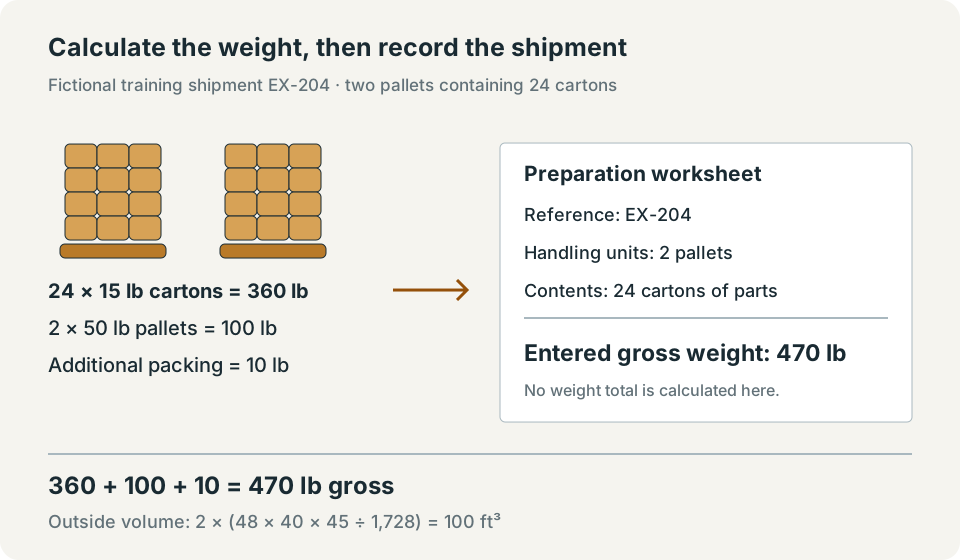
The arithmetic produces whole-pound and whole-cubic-foot values, so no rounding is needed. The associated calculators display up to 3 decimal places. The worksheet prints the weight text as entered; it has no separate rounding policy.
Preview, print and use the carrier's accepted document
Review every address, description, package count, weight unit and service note. “Print filled document” validates required entries. “Print blank template” produces an empty worksheet without clearing the form, and the selected format is retained.
Choose U.S. Letter and review the browser print preview before printing or saving a PDF. Long entries or multiple item rows can continue onto additional pages. The output omits carrier-specific terms, billing authorizations and signature blocks. Transfer confirmed information to the form accepted by your carrier.
Control your entries and saved copies
The form processes entries in this browser tab. It does not send them to the website or a carrier, save them in browser storage or put them in the page URL. Reloading the page clears entered document information. “Clear entries” returns the form to its initial values.
Printed copies and PDFs saved through your browser are under your control. File-reference fields contain names only; they do not upload or embed the actual files. See the privacy policy for website-request and email information.
Use the worksheet to prepare the accepted document
Confirm the freight, counts, weight basis and requested services before copying information into the carrier's accepted document. Keep calculation results and packing records with the worksheet so the entered shipment facts can be checked later.
FAQs
Does this worksheet replace a carrier's bill of lading?
No. Use the bill of lading accepted by the carrier for the actual shipment. This generic worksheet prepares shipment details but has no carrier terms or signature acceptance.
Does the worksheet add the item weights?
No. It prints each weight you enter with its selected unit. Calculate and verify totals separately before recording a shipment total.