
Record observations so the shipment can be reviewed accurately
A freight damage record brings the shipment reference, observation date, affected items and supporting-file names into one readable document. It helps another person locate the freight and understand what was actually observed.
This worksheet organizes information. It does not submit a claim, determine liability, calculate a loss value or establish a reporting deadline. Use the actual carrier's claims process and applicable terms for those decisions.
Complete the record from facts and existing documents
- Enter the shipment reference or a known PRO number (carrier-assigned freight reference). If available, include the number from the bill of lading. Record the observation date and location, then the person making the record.
- Add the carrier and delivery-receipt reference if known. Keep identifiers exactly as they appear on the original documents.
- Describe the condition under “What was observed.” Record visible packaging or goods damage, count differences and location within the shipment.
- Copy delivery-receipt notes as they were recorded. Keep those notes separate from observations made later.
- Add item rows with the identifier, affected quantity and specific observed condition.
- List supporting photo and document filenames, then record contacts and follow-up actions. Keep the actual files separately.
| Record area | Useful entry | Information that needs separate evidence |
|---|---|---|
| Packaging condition | “Carton C04 has a crushed lower-right corner.” | Who caused the damage or when it happened |
| Affected quantity | Named cartons and a count that does not duplicate them | The condition of items that have not been inspected |
| Supporting photographs | Filenames tied to a package identifier and view | A statement that unlisted files are attached to this output |
| Shipment weight | The documented or measured weight and its basis | A new billed weight or claim value inferred from damage |
The shipment reference, observation date, location and observed facts are required for filled printing. Each item row needs an identifier, positive whole affected quantity and condition. Up to 30 rows are supported. The worksheet does not total affected quantities, upload photos or attach the listed files to a PDF.
Worked example: record three affected cartons without changing the shipment facts
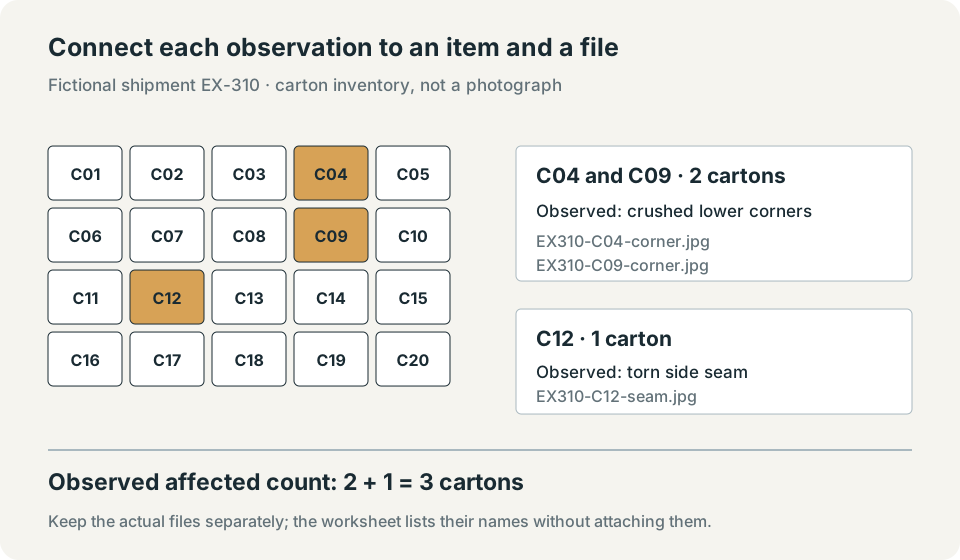
In this fictional receiving example, shipment EX-310 contains 20 cartons on one pallet. Cartons C04 and C09 have crushed corners; carton C12 has a torn seam. Count the first pair as 2 and C12 as 1: 3 affected cartons in this record. Do not list the same carton twice merely because it has more than one visible defect.
| Item / package identifier | Affected quantity | Observed condition | Supporting filename |
|---|---|---|---|
| C04 and C09 | 2 | Crushed lower corners | EX310-C04-corner.jpg; EX310-C09-corner.jpg |
| C12 | 1 | Torn side seam | EX310-C12-seam.jpg |
For the form, use reference EX-310, observation date November 14, 2026 and location “Receiving dock 2.” Enter the two rows above, describe the visible facts in the observation field, and put the filenames in the attachment-reference field. The printed record preserves those entries; it does not calculate the total of 3.
Keep the original gross-weight basis separate
Suppose the original packed cartons weighed 18 lb each, the pallet tare was 50 lb and additional packing weighed 5 lb. Enter quantity 20, unit weight 18 lb, 1 pallet, 50 lb tare and 5 lb extra packing in the gross-weight calculator.
Original prepared gross weight = (20 × 18) + (1 × 50) + 5 = 415 lbThis calculation checks the original weight basis. It does not establish the current received weight or justify subtracting three cartons because they are damaged. If a current weight is needed, record an appropriate measurement and identify when it was taken. These whole-pound inputs require no rounding.
Prepare a usable document and file inventory
Check the references, dates, item counts and descriptions in the preview, then print the filled record or save a PDF through the browser. The blank-template option leaves an empty record without clearing the form. Long observations or many rows may continue onto additional pages.
Retain the actual photographs, delivery receipt, shipment paperwork and any value records requested for the carrier's process. Keep packaging and contents available for possible inspection, and ask the carrier for instructions before discarding or changing them. The worksheet is not an exhaustive list of claim requirements.
Control your entries and saved copies
The form processes entries in this browser tab. It does not send them to the website or a carrier, save them in browser storage or put them in the page URL. Reloading the page clears entered document information. “Clear entries” returns the form to its initial values.
Printed copies and PDFs saved through your browser are under your control. File-reference fields contain names only; they do not upload or embed the actual files. See the privacy policy for website-request and email information.
Keep the observation record connected to its evidence
Use consistent shipment and package identifiers, distinguish observations from conclusions, and retain the files named in the record. Follow the actual carrier's process for notification, inspection and any claim submission.
FAQs
Can I attach photographs through this form?
No. The attachment field records filenames or references only. Keep the actual files separately and include them through the carrier's process if requested.
Does this record state the claim deadline?
No universal deadline is supplied. Check the carrier's current terms and promptly follow its instructions for notice, inspection and claim filing.